❗ System Requirements:
Minimum Training Configuration:
- Python: 3.11 or later (the
uvpackage manager is recommended) - GPU: NVIDIA GPU required; A100 or H100 recommended
- Memory: 32 GB or more of system RAM
- Storage: 100 GB or more of available space on an NVMe SSD
- Operating system: Ubuntu 22.04 LTS or later
- Network: Access to GitHub
Minimum Deployment Configuration:
- Python: 3.11 or later (the
uvpackage manager is recommended) - GPU: NVIDIA GPU with at least 12 GB of VRAM; GeForce RTX 3090 (24 GB) or better recommended
- CPU: At least six cores; Intel Core i7-10700K, AMD Ryzen 5 5600X, or better recommended
- Memory: 16 GB or more of system RAM
- Storage: At least 30 GB of available space
- Operating system: Ubuntu 20.04 LTS or later
- Network: Access to GitHub
Material Purchase Links:
- Candy: One box of "Big White Rabbit 500g Money Rabbit Like Gift Box"
- Cream-colored fruit plate: Use the "Luxury Fruit Plate 2-in-1 [Cream White + Transparent]" in cream color for the fruit plate
1. Task Overview
This release provides a complete solution for the candy dispensing task implemented based on Pi05, including the open-sourced dataset, model weights, and training and inference source code. The task triggers candy dispensing upon recognition of a human hand gesture—specifically, a palm-up orientation—and is designed to validate TRON2's fundamental pick-and-place atomic operation capabilities in target perception and end-effector tracking scenarios. Developers may refer to the standardized development pipeline presented in this project to migrate the complete technical framework to various pick-and-place robotic tasks. Leveraging the accompanying data acquisition platform and embodied robotics platform, users can independently carry out the end-to-end development of custom tasks and rapidly build embodied-AI robotic application scenarios tailored to their specific business requirements.
The development workflow for the dual-arm manipulation project comprises three main stages: Data Collection → Model Training → Model Deployment.
💡 Training Is Optional:
You do not need to train a model to try the candy dispensing task. To evaluate the result quickly, skip Sections 2–4, download the released pre-trained weights (Section 5.1.2), and go straight to deployment (Section 5). Collect data and train a model yourself only if you want to customize the task or reproduce the training results.
Pi0.5 is a Vision-Language-Action (VLA) model developed by Physical Intelligence. For those intending to fine-tune such models using data exported from embodied-data platforms, this guide provides a walkthrough of the complete pipeline based on the official OpenPI framework. It also describes how to perform efficient fine-tuning of the pre-trained Pi0.5 model on custom datasets.
2. Data Collection
2.1 Environment Setup
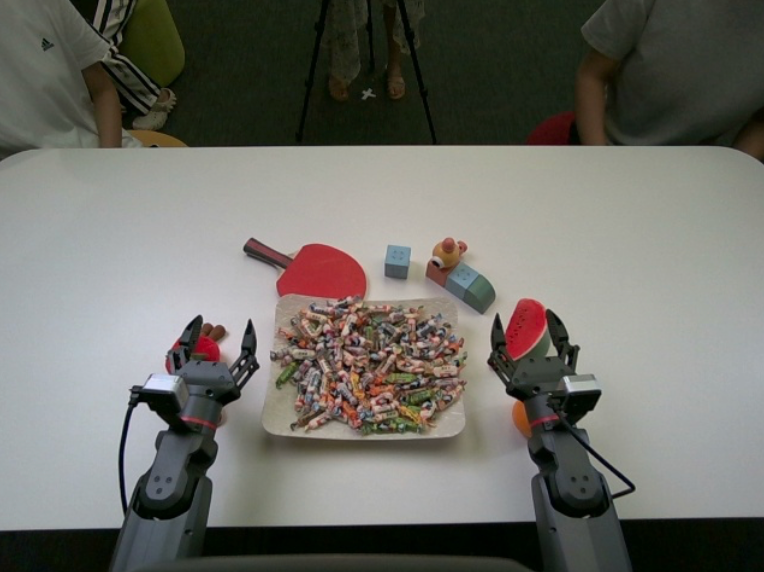
For the candy dispensing task, in order to better leverage the datasets that have been collected and publicly released by LimX Dynamics, it is recommended to replicate the official data collection environment as closely as possible. The specific setup requirements are as follows:
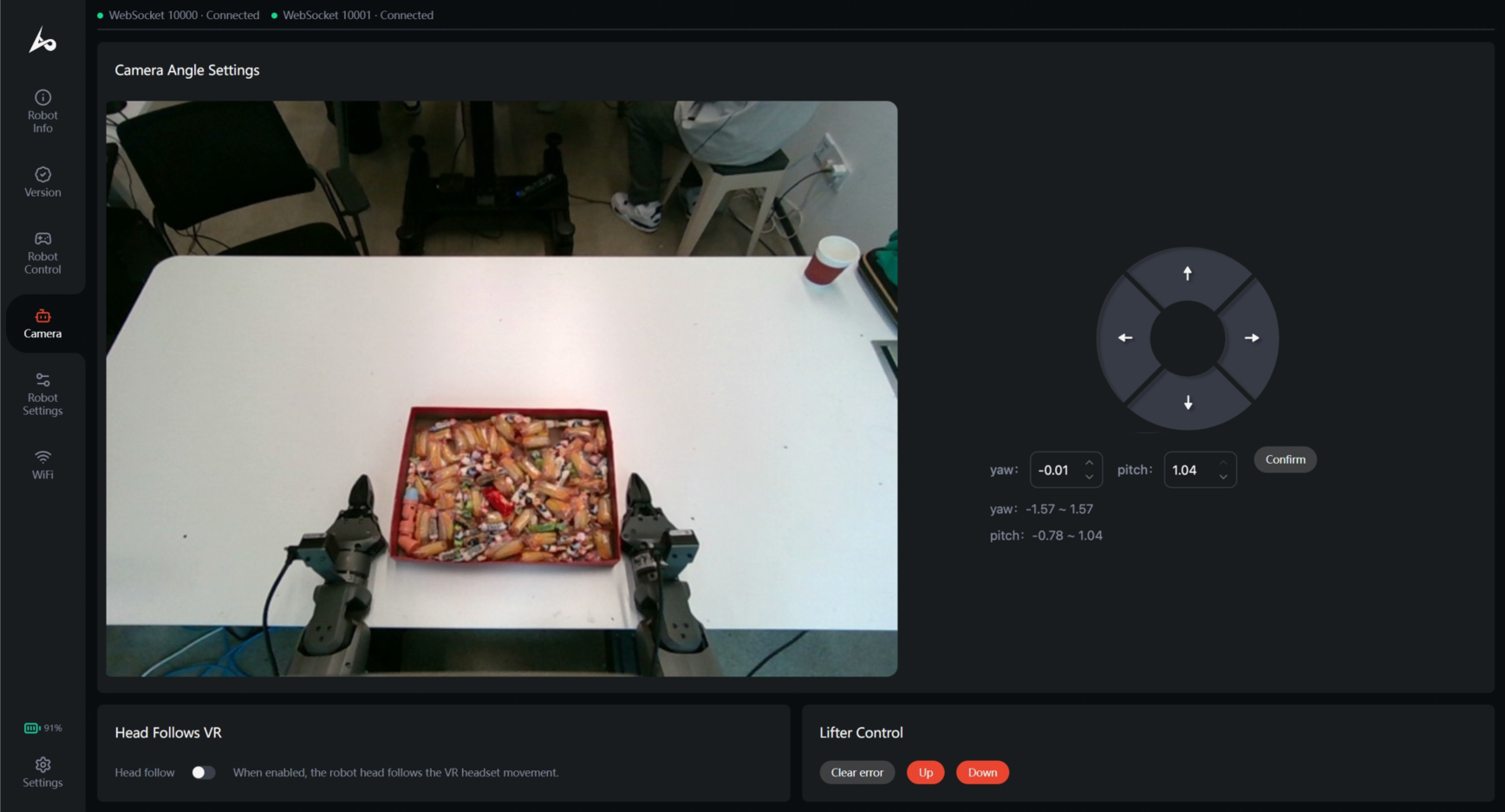
- Robot Mode: The robot is switched to teleoperation mode via the controller (TeleOperator).
- Table Specifications: Dimensions of 160 × 80 × 75 cm (length × width × height), with a pure white tabletop. (The height should be kept as consistent as possible.)
- Robot Placement: With the fixing bracket in place, the robot is positioned such that the edge of the robot is 15 cm from the edge of the table.
- Prop Placement: Candies are densely placed in the central area of the tabletop near the robot side, with a beige serving tray placed underneath. The placement should ensure that both arms of the robot are able to reach and grasp the candies.
2.2 Connecting the TRON2 Robot
Connect your computer to the robot by following Section 6: Robot Network Connection in the TRON 2 User Manual.
2.3 Accessing the Data Acquisition Platform
Make sure the external development expansion module is connected to the robot by Ethernet and your computer is connected to the robot's Wi-Fi. Alternatively, connect your computer directly to an Ethernet port on the module. Open https://10.192.1.4/ in your browser to access the local data acquisition interface.
2.4 TRON 2 Robot Configuration
- Robot Status: After switching the controller to TeleOperator mode, the robot's head will automatically adjust to its lowest posture and rotate to the center position (
pitch = 1.04,yaw = 0). Once connected to the robot, check whether the viewing angle is appropriate on the data acquisition software overview page at https://10.192.1.4/. - Follow Section 5.3: Teleoperation Preparation and Section 5.4: Using Teleoperation in the TRON 2 User Manual to prepare the robot for teleoperation.
💡 Additionally, we have open-sourced a data conversion script: 📎 limx_mcap2lerobot.zip.
2.6 Dataset Validation
~/Desktop/lerobot_dataset$ tree -d
.
├── data
│   └── chunk-000
├── meta
│   └── episodes
│       └── chunk-000
└── videos
    ├── observation.images.cam_high
    │   └── chunk-000
    ├── observation.images.cam_left_wrist
    │   └── chunk-000
    └── observation.images.cam_right_wrist
        └── chunk-000
3. Dataset Description
- Dataset Statistics:
| Metric | Value |
|---|---|
| Data Description | 1953 episodes |
| Data URL | https://huggingface.co/limx-tron2/tron2-openpi-models |
| Task Type | Candy Dispensing (Pick & Place) |
| Collection Method | Pico (VR Teleoperation) |
| Data Format | Lerobot2.1 |
4. Model Training
| Training Method | Use Case | Advantages |
|---|---|---|
| Training with Self-Hosted Compute | Experienced developers with existing compute resources (local servers or cloud resources) who are familiar with cloud development |
|
4.1 Training with Self-Hosted Compute
⚠️ Note:
Before training models with self-hosted compute, please refer to Minimum Training Configuration at the beginning of this document.
💡 About the Training Framework:
- The underlying technology stack of the OpenPI open-source project includes both JAX and PyTorch frameworks for training its core model Pi05. Since OpenPI's native training framework is JAX, and the core model, training pipeline, and base checkpoints are all built on JAX/Flax, this project defaults to the JAX framework for training.
- JAX is a computational tool for model training, similar in positioning to PyTorch—it is not a model or an algorithm, but simply "a framework for running models."
- JAX's advantage lies in its high computational efficiency, making it particularly suitable for large model training scenarios. This project selects JAX precisely because it is more efficient for training large models like Pi0.5.
If you wish to train models with open-source or custom datasets in a self-hosted compute environment, you may refer to the procedure below in conjunction with the open-source code. The current open-source code has completed the adaptation of the OpenPI source code to TRON2. This document uses Pi05 as an example for illustration.
4.1.1 Environment Setup
git clone https://github.com/limx-tron2/tron2_openpi.git
git clone https://github.com/limx-tron2/tron2_env.git

cd tron2_openpi

sudo apt install pkg-config
sudo apt install software-properties-common -y
sudo add-apt-repository ppa:ubuntuhandbook1/ffmpeg7 -y
sudo apt install ffmpeg libavformat-dev libavcodec-dev libavdevice-dev libavutil-dev libswscale-dev libswresample-dev libavfilter-dev -y

uv sync
uv pip install -e .

source .venv/bin/activate
uv pip install -e "../tron2_env[bridge,openpi]" # Activate the current environment

# Verify successful installation; should output the path: ../tron2_env/src/tron2_env/__init__.py
PYTHONPATH="$(cd ../tron2_env/src && pwd)" uv run python -c "import tron2_env; print(tron2_env.__file__)"
4.1.2 Training Procedure
-
It is recommended to manage parameters using independent YAML task configuration files rather than directly modifying
src/openpi/training/config.py. This facilitates configuration isolation, version management, and reusability:cp configs/train/tron2_tasks/example.yaml configs/train/tron2_tasks/my_task.yaml -
Open the configuration file
configs/train/tron2_tasks/my_task.yamland modify the dataset path parameterrepo_id: my_dataset. The system constructs the full dataset path via the environment variableHF_LEROBOT_HOME. The local directory must follow a fixed structure:$HF_LEROBOT_HOME/my_dataset/data/: stores raw data such as images, trajectories, and actions.$HF_LEROBOT_HOME/my_dataset/meta/: stores dataset statistics, task descriptions, and episode information.
export HF_LEROBOT_HOME=/path/to/datasets -
Dataset normalization parameters are a necessary prerequisite for training convergence. Before the first training run, execute the normalization statistics script (
compute_norm_stats.py) to compute the statistics file:uv run scripts/compute_norm_stats.py \ --task-config configs/train/tron2_tasks/my_task.yaml -
After the statistics computation is complete, execute the training script to start training:
uv run scripts/train_tron2_task.py \
  --task-config configs/train/tron2_tasks/my_task.yaml
❗ Note:
We provide an all-in-one entry script, scripts/cloud_train_entrypoint_portable.sh, that eliminates the need for step-by-step execution:
- When the
--skip-normparameter is not provided, the script will automatically compute normalization statistics first, then start training. - To skip the statistics computation, add the
--skip-normparameter.
Local Custom Path Mode
When self-hosted compute does not have a unified mount directory, manually specify the full paths for the dataset, weights, and output:
scripts/cloud_train_entrypoint_portable.sh \
  --data-dir /path/to/datasets \
  --repo-id my_dataset \
  --weight /path/to/checkpoint/params \
  --output-dir /path/to/output \
  --exp my_task \
  --prompt "perform the configured task" \
  --max-frames 100000
Custom YAML Configuration File Mode
Directly load the pre-edited my_task.yaml, which centrally manages parameters such as repo_id, weight_loader, assets_base_dir, and checkpoint_base_dir. You only need to specify HF_LEROBOT_HOME via --data-dir:
scripts/cloud_train_entrypoint_portable.sh \
  --task-config configs/train/tron2_tasks/my_task.yaml \
  --exp my_task \
  --data-dir "$HF_LEROBOT_HOME" \
  --max-frames 100000
❗ Additional Notes:
- Custom task configuration files (e.g.
my_task.yaml) are already configured in.gitignoreand will not be committed to the code repository; the repository only retains the generic model configconfigs/train/tron2_tasks/example.yaml. - The template YAML supports the following configuration items: dataset
repo_id, task textprompt, data column definitions, action prediction horizonaction_horizon, state dimensionstate_dim, pre-trained base checkpoint, training output path, and optionalprompt_from_taskandrtc_training_simulated_delay.
5. Model Deployment
You can deploy either the released pre-trained weights (no training required) or weights you trained yourself in Section 4. To use the released weights, follow Sections 5.1.1 to 5.1.5 as written.
5.1 Inference Deployment Procedure
⚠️
- Robot initial posture requirement: Ensure the robot is in the L1+X standard initial state, with both arms naturally vertical against the sides of the body. After starting the client, the robot will automatically extend both arms sideways and then forward. If not in the initial state, the robot may directly raise both arms. Be cautious of obstacles in front.
- Before inference, the robot controller must be switched to High-Level Developer Mode (High-Level Dev).
- If the table height, bracket distance from the table edge, lighting environment, and head angle were not changed during data collection, they must remain consistent during inference.
- For other environment-related constraints, please refer to Minimum Deployment Configuration at the beginning of this document.
- Camera connection mode description:
- Bridge Mode: Pull image data via TRON2 Bridge, and simultaneously use robot state information calibrated by Bridge.
- Legacy Local Direct Connection Mode: The local inference host directly connects to RealSense cameras and obtains state from the robot's WebSocket (in this case, the USB ports of the robot's three cameras must be connected to the inference chassis).
- When
client.max_stepsisnull, the client needs to be stopped manually.
5.1.1 Environment Setup
git clone https://github.com/limx-tron2/tron2_openpi.git
git clone https://github.com/limx-tron2/tron2_env.git

cd tron2_openpi

sudo apt install pkg-config
sudo apt install software-properties-common -y
sudo add-apt-repository ppa:ubuntuhandbook1/ffmpeg7 -y
sudo apt install ffmpeg libavformat-dev libavcodec-dev libavdevice-dev libavutil-dev libswscale-dev libswresample-dev libavfilter-dev -y

uv sync
uv pip install -e .

source .venv/bin/activate
uv pip install -e "../tron2_env[bridge,openpi]"

# Verify successful installation; should output the path: ../tron2_env/src/tron2_env/__init__.py
PYTHONPATH="$(cd ../tron2_env/src && pwd)" uv run python -c "import tron2_env; print(tron2_env.__file__)"
5.1.2 Weight Download
The pi05_tron2_candy weights are already trained on the candy dispensing dataset. You can use them directly without training. Download them into the checkpoints folder under /home/linux_user_name/xxx/tron2_openpi from Hugging Face.
cd /home/xxx/xxx/tron2_openpi
mkdir checkpoints
hf download limxdynamics/tron2-openpi-models \
  --repo-type model \
  --include "pi05_tron2_candy/**" \
  --local-dir ./checkpoints
After the download completes, the checkpoint is located at checkpoints/pi05_tron2_candy/candy_h30_rtc_25000.
5.1.3 Deployment Configuration
- The three YAML files in
/home/linux_user_name/xxx/tron2_openpi/configs/deployare our example configurations. Among them,candy_server.yamlandcandy_client.yamlare public example configurations for the Candy task, containing various parameters that you can modify according to the comments. - Before using with your own robot, please carefully verify that the checkpoint path, robot address, Bridge address, initial posture, and safety procedures are all appropriate for your deployment.
- Common parameters to modify (minimum local configuration example shown below; the address refers to the policy content in any
candy_server.yamlfile you use undertron2_openpi/configs/deploy/; detailed configuration descriptions are written in the YAML comments):
policy:
  config: TASK_CONFIG_NAME # Training configuration name; corresponds to lines 642-653 of /home/xxx/xxx/tron2_openpi/src/openpi/training/config.py
  repo_id: DATASET_REPO_ID # Must match the asset subdirectory of the checkpoint file; our open-source weights default to "input"
  checkpoint_dir: /path/to/checkpoints/TASK_CONFIG_NAME/experiment/step # Checkpoint path; can be an absolute path or a relative path to tron2_openpi
  default_prompt: TASK_PROMPT # Candy dispensing demo defaults to "Hand out the candy"
robot:
  ip: ROBOT_IP
client:
  observation_source: bridge
  max_steps: null
If you use the released pre-trained weights, configs/deploy/candy_server.yaml already contains the matching values. You only need to confirm the following:
policy:
  config: pi05_tron2_candy
  repo_id: input
  checkpoint_dir: checkpoints/pi05_tron2_candy/candy_h30_rtc_25000
  default_prompt: Hand out the candy
robot:
  ip: ROBOT_IP # Replace with your robot's IP address
If you trained the model yourself, set config, repo_id, and checkpoint_dir to match your training output.
5.1.4 Robot Environment
- Ensure the robot is in the post-L1+X initial state, i.e., both arms are vertically positioned at the sides.
- Switch the controller to High-Level Developer Mode (High-Level-Develop).
5.1.5 Start Policy Server
-
Start the policy server in one terminal:
cd tron2_openpi uv run scripts/serve_policy.py --profile configs/deploy/candy_server.yaml -
Start the TRON2 client in another terminal:
cd tron2_openpi uv run examples/tron2/pi_client_rtc.py --profile configs/deploy/candy_client.yaml -
After running the client, the robotic arms will smoothly transition from the vertical side position to the forearm-vertical side position. Subsequently, you can place your palm-up hand within the camera's field of view for inference verification.
6. Code Repositories and Resources
| Resource | Description | Link |
|---|---|---|
| tron2_openpi | Training and inference source code (OpenPI adapted for TRON2), including the deployment configurations in configs/deploy |
https://github.com/limxdynamics/tron2_openpi |
| tron2_env | TRON2 environment package required by tron2_openpi for training and deployment |
https://github.com/limxdynamics/tron2_env |
| Pre-trained weights | Released model weights, including pi05_tron2_candy |
https://huggingface.co/limxdynamics/tron2-openpi-models |
| Data conversion script | Converts recorded MCAP data to the LeRobot format | limx_mcap2lerobot.zip |